whatsapp -->

2023 à´’à´•്‌à´Ÿോബർ 18, à´¬ുà´§à´¨ാà´´്‌à´š

How to become a whatsapp beta tester in 2023 | [Updated]

Whatsapp beta tester

The WhatsApp beta tester program is usually complete on Google Play, but there is a way to get into the selected group. We show you how! just read out thi article How to become whatsapp beta tester


WhatsApp beta tester | We know that WhatsApp is constantly incorporating new features into their Android application. Even, many of these developments could be considered as minor, but that does not mean that the application does not make any improvements. It advances slowly due to the huge number of monthly users it has: more than 1.5 billion people use WhatsApp.

If you tend to follow the activity of the application you will know that it is the beta that first receives the updates then they land in the stable version. This beta is updated frequently, often every day. The problem is that it is not easy to enter since the company has closed the quota from Google Play. Well, there is a little trick that allows you to activate the beta again.


How to become a beta tester for WhatsApp messenger


whatsapp beta latest version download

There are several ways to get the WhatsApp beta latest version. One of them is installing WhatsApp beta Apk, the company itself is uploading the latest versions on their website; You can also download the latest files from secure pages, such as UpToDown; and then there is the simplest way: receive WhatsApp beta updates on time from Google Play.
whatsapp beta tester
In general, anyone can sign up for the beta of the applications and try directly from the mobile phone: just enter the store tab, descend to the bottom and sign up in the betas section. The pity is that, if you do this process in the WhatsApp application, you will surely see the message " The Beta program is complete ". Of course, there is a very simple way to skip the limitation.

  • Open a web browser and make sure you have logged in with the same Google account you use in the Play Store (serves the desktop browser).
  • Click on " Become a tester ". You will automatically have entered the betas group.
  • Go to your Google Play Store app and you'll see that a new WhatsApp update is coming up.

    whatsapp beta tesster


    Once you sign up for the betas program, all the updates you download will be from that beta. This means that your WhatsApp may not work correctly or may have errors, something logical in the development versions. In return, you will get all the new updates first hand and according to WhatsApp you will be releasing them: from my experience you will not have any problem with the chats and conversations that you have saved.


    whatsapp beta tester

    In the event that you wish to exit the betas program, you will only have to access the same link and click on " Exit the program ".

    2019 à´“à´—à´¸്à´±്à´±് 14, à´¬ുà´§à´¨ാà´´്‌à´š

    How to activate whatsapp fingerprint lock

    whatsapp fingerprint lock, whatsapp beta tester

    Do you want to add extra security to your WhatsApp? Now you can block it with the fingerprint if you install the latest beta. We will show you how to activate fingerprint lock on whatsapp.

    It never hurts that an application used by hundreds of millions of users includes extra security when it comes to hiding their conversations from other people. This is what WhatsApp finally did after activating the fingerprint scanner in its Android application: if you have the latest beta installed, you can already protect your chats with your fingerprint. And it is much more practical than it seems.


    The logical thing is that no one accesses your conversations if you block the phone because they should not know your password, but it does not have to be the only security measure: adding the fingerprint to your WhatsApp you can make sure that nobody else reads your private messages. It even allows you to get a fairly desired extra: the new setting can hide the content of WhatsApp messages in notifications. This way only you can read what they tell you through the messaging application.

    How to protect your WhatsApp from any curious look? You just have to protect it with the fingerprint by following the following process.

    Access the privacy settings of your WhatsApp to protect it with your fingerprints

    whatsapp fingerprint lock, whatsapp beta tester

    WhatsApp already included a double authentication system with a six-digit pin that you can configure, but does not jump every time the application is opened, so it does not prevent someone from reading your conversations if they already have access to the phone. With the fingerprint, there are no cracks.

    To protect the chats with the footprint you need the latest beta update of WhatsApp. In case you do not have access to the beta you can sign up by following these steps. Or you can install the Apk with the fingerprint adjustment: just download it from Apk Mirror. After:


    • Access the settings of your WhatsApp by clicking on the three points in the upper right corner of the screen.
    • Enter the " Account " options , then "Privacy."
    • Scroll down to the " Fingerprint lock " option .
    • Now you just have to activate the option " Unlock with your fingerprint ". Confirm with the fingerprint registered on your phone.
    • You can choose three automatic locks: just close WhatsApp, after 1 minute after closing or after half an hour. You decide, but the first option is the safest. Also somewhat cumbersome since you will always have to put the mark to enter your conversations.
    • The last setting allows you to block the content of messages in notifications. If you don't want them to be read, activate it.


    From the moment you set the fingerprint in your messaging application, nobody can read your messages if they don't ask you for permission to do so. Obviously, your mobile must have a fingerprint reader; In addition to having registered a fingerprint for access to the system.

    conclusion


    To get the latest WhatsApp beta updates you need to signup for whatsapp beta tester program.
    unless you need to try the apk from other sites.

    i hope you found this article helpful. if so would you consider sharing it with others?
    if you have any queries please mention it in the comment box below.

    2019 à´“à´—à´¸്à´±്à´±് 1, à´µ്à´¯ാà´´ാà´´്‌à´š

    Telegram Desktop [ Review ]

    telegram desktop

    Do you know what Telegram Desktop is? you may know what is telegram but not heard about the desktop version. so today we are going to explain all about this desktop version of telegram application and how it can be used in your case.

    Telegram has been crowned as one of the most popular application in Android It is one of the few, almost the only, able to stand up with WhatsApp in the field of instant messaging apps. but Most users using the smartphone version of the telegram don't know it has two versions.

    Read: How to become Whatsapp Beta tester

    What is Telegram Desktop


    Telegram Desktop is simply the computer version of the application. It is synchronized with the user's account so that it is possible to send and receive messages in a normal way. in this way, it can be used on the computer. It is possible to use in all types of operating systems because there are versions for Windows, macOS, Linux 32 bit and Linux 64 bit are available. therefore, everyone can access telegram.

    At the interface level, it does not present many differences with respect to the smartphone version of Telegram. On the left side, there is a column with all the chats that are open. Just click on one to put on the screen and send messages to another person. To access the menu, you must use the icon of the three horizontal stripes and then click on the desired option, such as entering the settings.

    Therefore, it is a version that is very easy to use for all those who have Telegram on their smartphone. It will be synchronized with the account that is held on the smartphone at all times. This means that the messages received in either of the two versions will also be shown in the other. Even if the phone does not have an Internet connection at that time.

    How to have Telegram Desktop

    telegram desktop

    Unlike the computer version of WhatsApp, which can only be used from the browser, Telegram Desktop is an application to download. Like any other application on the computer. While it is a light app, it takes up little space and does not affect the performance of the computer too much. To download it, you must enter the official website, From this link Telegram Desktop.

    On the web you have to choose the version you want to download in each case, depending on the operating system. Then, you just have to wait for it to download and run the file that is downloaded. The usual steps when installing an application on the computer. When it is completed, you will be able to open Telegram Desktop on your computer.

    How to synchronize the account


    When opening the computer version, the first thing to ask is to enter the phone number. It must be the mobile number associated with the account on the smartphone. When this number has been entered, a code will be sent to the phone, which must be entered in Telegram Desktop. It is the measure used for this synchronization between the two.

    So when the code has been entered and it is correct, the two versions of the application will be synchronized. After a few seconds, the chats that are in the application will appear on the computer screen. This means that it is now possible to use Telegram Desktop normally and all messages that are sent will also be shown in the smartphone version of the application.

    In addition, it will be able to be used even if the account in the phone is not active at a certain time. That is, if the phone does not have an Internet connection at that time, you can use the desktop version normally. A good solution if you have finished mobile data on the phone or simply want to save on your consumption.

    Dark mode in Telegram Desktop

    telegram desktop

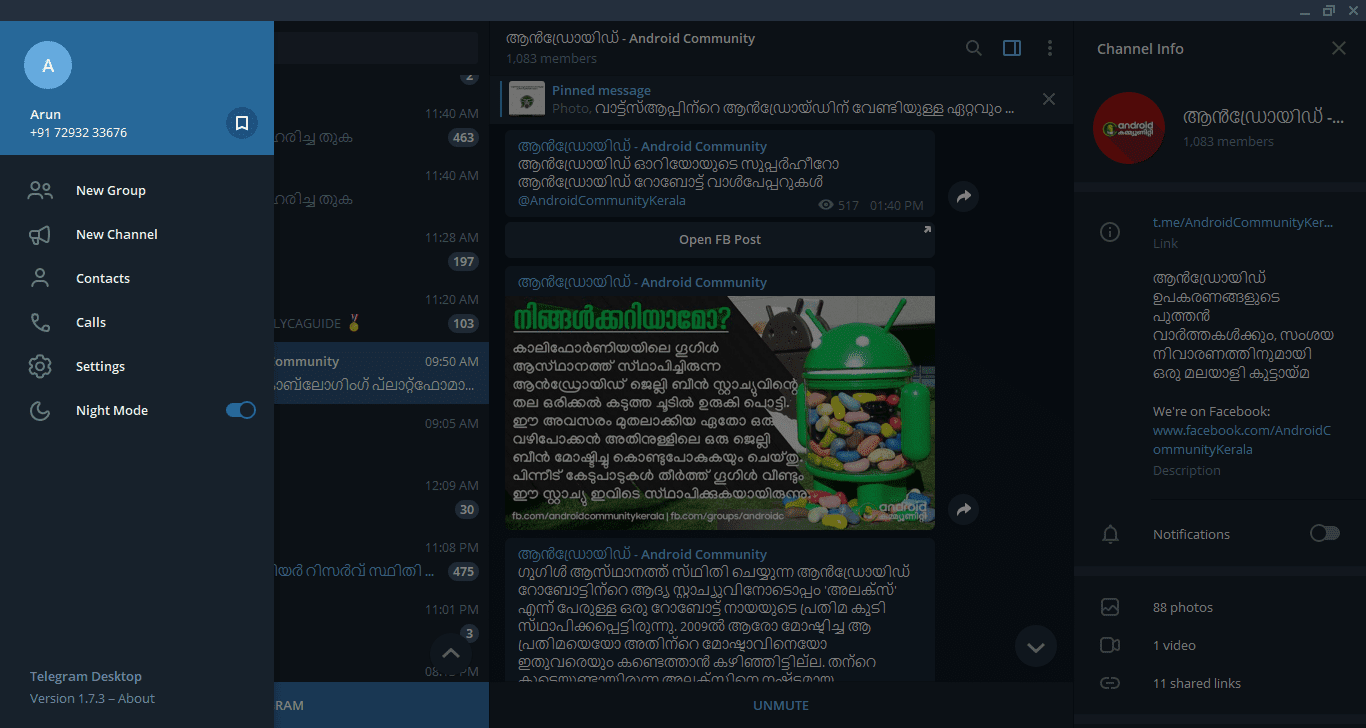
    One of the star functions in Telegram Desktop is the presence of dark mode. More and more applications, both Android and Windows, make use of this feature. This desktop version also has it. In addition, the way to proceed with its activation is very simple.

    Click on the icon of the three horizontal stripes in the upper left
    Press the switch next to the dark mode

    In this way, the interface of the application becomes a dark blue tone in its entirety. Both the background of the chats and the background of the interface in general. When you want to return to normal mode, you just have to turn off the switch again. So its use does not present any problem.

    Send files


    One of the great advantages of having Telegram on the computer and on the phone is that it becomes the perfect way to send files between the two devices. As many already know, the application allows you to send messages to yourself, in the chat called Saved messages. Since the two are synchronized, you can have access to this chat on both computer and Android.

    Therefore, if you want to send photos, videos or any type of files between the two, it is possible to use Telegram. To do this, just select the files in question and send them to the conversation of Saved Messages. If it has been done from the phone, when accessing the chat on the computer, you only have to click on send file to save it. You are simply asked to choose a location on the computer for it.

    In addition, the application allows you to send relatively large files. So it becomes a good alternative if you have to send a heavy file or many files at the same time. Its ease of use is the other great advantage it provides in this regard.

    What is the advantage of using it on a desk in front of the telephone?


    This is a field that can depend a lot on the personal choices and preferences of each user. In my personal case, I find it more comfortable to use the desktop version at the time of writing, because I find it more comfortable to write on the computer than on the phone. In addition, in the desktop version, you have on the right side the profile of each user with whom you speak. But you also have access to the multimedia files that have been shared in these conversations.

    So, if you want to see the photos that a contact has sent at a specific time, just click on photos and all the photos will appear, divided according to the month in which they were sent. The same thing happens with videos or files in general. It makes it easy to access them, without having to be looking in the conversation.

    conclusion

    I hope you found this article helpful. If so would you consider sharing it with your friends?
    If you have any doubts and queries, please mention it in the comment box below.


    2018 നവംബർ 14, à´¬ുà´§à´¨ാà´´്‌à´š

    Create your own stickers for whatsapp

    add custom emoji to whatsapp, whatsapp stickers


    WhatsApp Stickers | Create Your Own Stickers for WhatsApp - Maybe they have arrived late, but that does not mean that WhatsApp users stop enjoying with the new stickers. And is that the stickers are usually better than the emoji when it comes to expressing emotion: they are much more varied and allow you to give the humorous touch to conversations with a single gesture. Especially if you have your own custom pack ...

    whatsapp sticker images


    Imagine that you want to create your own stickers pack to use in WhatsApp . It may seem like a complicated process, but it is not so complicated since there is an application that facilitates the task of adding them: Stickers Maker for WhatsApp - Create New WA Packs . The name of the application already says it all because it opens the door to make personalized stickers.


    Now you can create custom stickers with your name, image & fonts, own WAStickerApps Packs, Also create dialogues in any language.

    stickers for whatsapp iphone


    Highlights of this Application

    - Add Texts with different languages (English, Malayalam,Hindi,Tamil,Telugu,Kannada,Bengali)
    - Each language have different fonts
    - A huge selection of Clip arts, Emoticons, packs
    - Draw layer by layer. Give effects to each layer
    - Adjust text color, size, stroke, shadow and curving
    - Use patterns for text background
    - Shapes can be used
    - Image cropping/blurring support
    - Duplicate/Copy Layer option available
    - Your own logo can be added to any of the images that you create.

    How to Create Stickers with Your photos

    Now i will show you How to create stickers with your photos on WhatsApp. So first you need to download this Application 

    Whatsapp sticker maker


    After Downloading the Application from playstore, open it, and follow my steps

    • Open the Application, and click on Create New sticker,  Now a menu will come from left side
    • Click on Add Image
    • Select an Image to create new sticker, Now a menu will come with some options, crope the image if you want.
    • To erase the background click option Erase from the menu, You can select any tool to erase the background ( Auto, Lasso, Manual).
    • If you select Auto it will automatically delete area with same color when you click on color, The Lasso tool helps you to delete outside or inner portion of the selected area. Also you can delete background manually,
    • Also you can add dialogues in different languages, emoticons, and cliparts.
    • Save it after editing, and Click ADD TO WHATSAPP.


    Now this stickers pack would be added in your whatsapp, 

    Conclusion


    This is not the only apllication that can create stickers for you, there are many apps available. I will post about it soon
    I hope you liked this Article ,if So Please share it with others who might appreciate this as well.
    If you have any Doubts about this article, please mention it in the comment box.  

    2018 നവംബർ 2, à´µെà´³്à´³ിà´¯ാà´´്‌à´š

    Telegram proves to be better than WhatsApp by creating best sticker packs for WhatsApp

    whatsapp stickers by telegram


    Whatsapp stickers from Telegram | Telegram is the main rival of WhatsApp, but it has shown class and elegance when creating stickers packs for WhatsApp that were in Telegram.

    A few days ago we told you the news that WhatsApp finally added the stickers in your messaging application. In its endless struggle, Telegram has decided to teach WhatsApp a lesson by launching its own sticker pack on WhatsApp.


    WhatsApp and its curious approach to stickers


    The discussion about whether WhatsApp or Telegram is better has been around since Telegram exists. For many, it is a more innovative platform, which implements new functions before anyone else, while WhatsApp is only dedicated to copy. In the same way, there is little use of such technology if at the end you want to talk with neither use nor plan to use Telegram.


    Personally, I use both applications, and what I miss most in WhatsApp are the stickers. I am addicted to expressing my answers or emotions with stickers. It's not something that Telegram invented, but Telegram is the only messaging application I use that has them

    The arrival of stickers to WhatsApp is being progressive. After months of rumors, they have arrived and they are here to stay. The implementation of these stickers packs is a bit strange since you have to download the stickers packs as if they were applications in Google Play.

    The best stickers packs for WhatsApp are from Telegram

    whatsapp stickers by telegram web


    Telegram has decided to rekindle the war of messaging applications. Someone in Telegram has thought that if WhatsApp does not go to the stickers, it is the stickers that arrive to WhatsApp.

    If we go to the developer profile of Telegram X, an official alternative version of Telegram, we will find two new applications. They are pack of icons that we already had in Telegram, of Telegram, but for WhatsApp. There are two packages:


    Has Telegram been delivered to WhatsApp? Well, it seems that no, and that is that the stickers packs include Telegram advertising. At the end of the packs, the application recommends that we download Telegram to have the best stickers experience.

    Whether you're a fan or not of Telegram, it's a very elegant move to promote your application, just as they carry part of the experience we like about Telegram to its main rival.


    Also read

    ∎   How to download more stickers for whatsapp
    ∎   How to become whatsapp beta tester
    ∎   Ads on whatsapp for 2019 confirmed-by-facebook

    2018 à´’à´•്‌à´Ÿോബർ 26, à´µെà´³്à´³ിà´¯ാà´´്‌à´š

    How to download more stickers for WhatsApp


    WhatsApp Stickers | WhatsApp activated the stickers or,  those emoticons to giant size that allow to express more emotions. But how to download more? We teach you.

    After months of waiting for the news, and after it was available for some time in its most notable opponents, WhatsApp finally decided to include stickers in their application. Yes, it arrived very late in relation to Telegram and very late with respect to Line , which was the first to use the famous stickers. Even so, it is excellent news for the more than one billion users who use WhatsApp daily


    The stickers can be used from now on both Android and iOS. Although that yes, it is essential to have the latest version of the app . The stickers are free, WhatsApp has a huge collection of them, it will update this collection frequently and you can also download new stickers. Right here is where we are going to influence.

    WhatsApp allows the installation of new stickers from the Google Play Store


    Developers have the option of creating new stickers packs for WhatsApp users , so these users will be well supplied with material. The system aims to be as open as Telegram, at least in principle. In this way, not only will the officers be available, but also those created by other developers

    To access the WhatsApp stickers you must do the following:
     
    • Click on the emoji icon in any chat you have open.
    • Three icons will appear at the bottom: emojis, gifs and new stickers . In case you do not appear close WhatsApp and reopen it.
    • If you click on the stickers icon you will access the list of them that you have installed with the most used ones on the left. Look at the little " + " icon on the right. Click on it
    • You will access the "store" of WhatsApp stickers with all the available ones. If you go down to the bottom you will have access to a direct link to the Google Play Store so you can download more stickers.
    • You must bear in mind that currently, and given that WhatsApp stickers do not just take a few active hours, most apps that are listed will not really install the stickers on your WhatsApp since their operation will be to download simple images. This will change as the developers create adapted packs.
    • You can also get new stickers when they are sent to you. Click on the sticker and you will see several options. Click on "See more" and you will access the complete pack. Finish by clicking on "Download".

    WhatsApp stickers are developed in the WebP image format . They are installed and stored inside the application, being able to access the ones sent if you enter the " WhatsApp / Stickers " folder of your internal storage.

    2018 à´’à´•്‌à´Ÿോബർ 25, à´µ്à´¯ാà´´ാà´´്‌à´š

    New Update | Whatsapp brings Stickers


    New Update | Whatsapp brings Stickers - As expected, the stickers did not take long to arrive after WhatsApp updated the official page. Just a few hours after publishing this article, WhatsApp has started to update itself to offer stickers in the app. The change is coming little by little to all users if you have the correct version of the app.

    If you have used other messaging apps, the stickers will be familiar. You can download stickers packs of different themes, and share them with your friends. Perhaps the most striking thing is that the stickers appear two by two in the conversation; that is to say, that if you stick to put stickers these will not appear one per line, but two per line.

    How to get WhatsApp stickers


    New update brings stickers in whatsapp


    To begin with, the vital thing is to have the latest available version of WhatsApp. The latest version compatible with stickers is 2.18.310, but at the time of writing these words, the latest version is 2.18.329. That is the one that you should update since the old versions will not receive this novelty

    In Google Play it is not yet, but you can upgrade to WhatsApp Beta from sites like APKMirror, which already have version

    Download WhatsApp beta from Apkmirror

    Even if you have the latest version of WhatsApp, keep in mind that this new feature will not reach everyone at the same time. The activation of the functionality is taking place in a phased manner; so you may have to wait a bit to enjoy it. One recommendation is to reinstall the app, but be careful to lose your chats.

    What stickers are available and how to use them


    Whatsapp stickers


    For starters, WhatsApp offers twelve packets of stickers: Cuppy, Salty, Komo, Blblbap Friends, Unchl & Rollle, Shiba Inu, The Maladrolts, Koko, Fearless and Fabulous, Banana, Biscult and Hatch. At the moment they are all static stickers, but in the future, they will arrive animated.

    To use stickers, just click on the emoji icon in the box where you write. The emojis window and animated gifs will open; but now you should see a new option, which allows you to download stickers packages from the WhatsApp store.

    WhatsApp stickers arrive on the official website


    It seems a lie, but WhatsApp still does not have stickers, at least not officially. And we say that because it does not look like it; Facebook-owned service has been working on them for a long time, and you can use them with the developer options of the app, although you will need root.

    But the stable version of WhatsApp has not yet received this news, despite all the months that have passed; something especially remarkable considering that it is one of the most used features in other messaging apps, such as Telegram.


    The stickers have become the great successor of the emoji; They are more customizable, big, eye-catching and you can download new packages to expand your collection. So it was a matter of time before WhatsApp implemented them.

    We may have to wait for very little. We hope that an update will arrive soon that activates WhatsApp stickers; How suddenly? Well enough so that in WhatsApp they are already modifying the official help documents. Probably in the betas this week or the next.

    As they discovered in WABetaInfo the WhatsApp FAQ page has been updated with two new pages; one dedicated to using stickers on Android, and another dedicated to using them on iOS. Although the differences are minimal.

    The pages detail the steps to follow to download and use stickers. In any chat or group we just have to click on the emoticon icon; then, in the lower part, we will see a new option, between emojis and animated gifs. We just have to download the icon pack we want to download.

    In addition, we can also mark stickers as favourites (in case we have so many that we do not know where they are), and browse by category.

    It takes less to use the stickers on WhatsApp. Yes, it doesn't seem a lie.

    2018 à´’à´•്‌à´Ÿോബർ 9, à´šൊà´µ്à´µാà´´്à´š

    Ads on WhatsApp for 2019, confirmed by Facebook

    WhatsApp To Run Ads From 2019

    After a lot of rumors, the Italian head of Facebook has confirmed that the announcements will reach WhatsApp. And there is date: 2019.

    The relationship between WhatsApp and advertising has been anticipated since the messaging application was purchased by Facebook and stopped subsidizing the annual subscription. Many have been the rumors, and now we get official information that confirms the bad news: users of the messaging application can not escape the ads.

    While advertising will arrive in 2019 to the application, it will only show ads in the least used part, that of the Status . This has been confirmed by the person responsible for Facebook : asked about the media, and as the newspaper india today collects, there is no turning back. Not only was he going to collect the data, sooner or later Facebook had to recover the investment made with the purchase.

    The Status of WhatsApp will have announcements in 2019, confirmed by Facebook


    The latest rumor that came to us from TechCrunch was already advancing the States and the announcements, also that advertising would arrive in 2019. Now it is official, this has been confirmed by Luca Colombo , Country Manager of Facebook Italy.

    Facebook is focusing on making instant messaging attractive to businesses. WhatsApp Business is a good example , also the strategy of connecting companies with users through messages. In this sense, and given that businesses and brands are interested in reaching the 1.5 billion users of WhatsApp , Facebook will open the door to advertisements starting with the States.

    Although Luca Colombo has denied that advertising will appear in private chats, this will only be for now: Facebook is planning the best strategy to monetize the purchase of WhatsApp and nothing has been decided yet . Advertising is unlikely to get in the way of conversations, though. And, to do it, Luca assures that it will never be about unwanted communications or Spam.

    The departure of the founders of WhatsApp blurred the last obstacles to advertising entering the application. Facebook has full power to do what it deems appropriate, a fact that does not augur much future to the privacy of WhatsApp.


    WhatsApp usage figures are so high that it is logical that Facebook wants to exploit them


    Make the investment profitable , that is a maxim for any business. And, despite the fact that with the interconnection of WhatsApp and Facebook the company of Zuckerberg already obtains a huge amount of data, there is still a concrete way to obtain direct income. Charging high-volume businesses for accessing the service through WhatsApp Business was the first step. The following is direct mail

    Luca Colombo gave some last data to the Italian press that corroborate the immense size of WhatsApp. The messaging application has 1500 million monthly users; and these users upload 450 million States daily. The pinch of placing ads there will be considerable.
    © Copyright 2019 GeekSpeakS | All Rights Reserved